Last Friday morning, Robert Pasick, Ph.D., and I spoke at Leaders Connect, a networking event at Zingerman’s Roadhouse in Ann Arbor. Our topic was “Ten Steps to Meaningful Goals for 2017,” based on our recent book Self-Aware: A Guide for Success in Work and Life.
If you’re interested, you can watch the entire hour-plus of video on YouTube here.
I thought I’d share a quick video excerpt here, about three minutes of Rob and I chatting about how we collaborated on the book.
Over the summer, Robert Pasick and I collaborated on Self-Aware: A Guide for Success in Work and Life. The book grew out of Rob’s teaching at the University of Michigan and his experience as a psychologist and executive coach. I helped with the book editing, book project management, and publishing it to ebook and paperback.
Self-Aware – the Book
The book guides students through self-discovery assessments and reflection exercises. These activities help the reader explore their
strengths,
personality,
interests,
self-care requirements (mind and body),
mission and core values,
lifestyle values—balancing work, family, friends, health, self, and
sweet spot—the intersection of what you’re good at, what you can be paid for, what aligns with your values, and your passions.
The book coaches the student to write their own vision for success and a short and long term plan.
Self-Aware: A Guide for Success in Work and Life
Throughout, the book emphasizes that we don’t accomplish these things solo. We achieve things and learn through interacting with the world and through the support and guidance of friends, family, mentors, and good examples. Throughout the project, Rob and I kept each other on track, reminded each other of the larger vision and purpose, and had fun along the way.
I loved the project so much I am looking for other similar projects. If you have an idea for a book and need help with project management, editing, publishing to different formats, and then publicizing the book, get in touch! I want to be your book editor and publisher.
Edited 7/7/2017 as I no longer take book projects now that I work for Court Innovations.
You might think a curved and twisted spine may make yoga impossible. It’s the opposite: yoga makes living and breathing with scoliosis better. And Elise and DL’s new Yoga for Scoliosis book will help you do yoga better.
Through working on my posture and breath in yoga, I have learned how to reduce my thoracic curve, de-rotate my spine, and breathe into areas which are compressed. When I don’t practice, I know it. My back aches more with twinges and tightness. When I practice, I feel more integrated, graceful, and free.
Yoga for Scoliosis book
Yoga for Scoliosis book
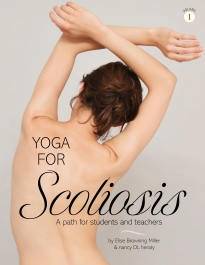
Elise Browning Miller and nancy DL heraty, two great yoga teachers, just released Yoga for Scoliosis: A Path for Students and Teachers. It is a wonderful book, clearly written with beautiful photographs and illustrations. It’s also quite practical: its spiral-bound pages lay open perfectly so I can consult it in the middle of my sequence.
This Yoga for Scoliosis book describes scoliosis, its four main patterns, and the benefits of yoga for scoliosis. The authors include instructions for beginning your own home practice (including advice about props) and then go into asanas and pranayama.
Covered asanas include:
standing poses
seated poses
back poses, backbends, and back strengtheners,
twisting poses,
supine and side-bending poses,
core strength poses,
inversion poses, and
breath awareness for scoliosis.
Each asana is well-described with at least one photograph, instructive text, variations, and specific adjustments for each pattern of scoliosis.
The book concludes with seven yoga for scoliosis practice sequences. These sequences are easy to skim and each refers back to the full instructions for each asana in the sequence.
About the Authors
Over the years, I have taken several workshops and classes from Iyengar yoga teacher Elise Browning Miller. Elise is based in Palo Alto, and she teaches all over the US and even internationally. I have followed her to Cleveland, Chicago, Kalamazoo, and Sonoma. Working with Elise has taught me how to use yoga to be stronger, more joyful, and work with my scoliosis rather than suffer with it. With her help, I have less pain and am lighter in my own body. Who wouldn’t want that?
When I have attended Elise’s workshops in Chicago, I met and worked with DL as well. DL co-authored the book with Elise and is a gentle and nurturing presence in workshops.
Get the Book!
If you teach yoga or do yoga and have scoliosis, get the book! You won’t be disappointed. You can purchase the book from Elise’s website.
How do you learn Google Analytics without practice? How can we train new people when analytics accounts are held private – like trade secrets.
Reading vs. Learning Google Analytics
You can find lots of resources to teach yourself Google Analytics. One of the very, very best is the informative, insightful, and thought-provoking writing of Avinash Kaushik. If you don’t already follow his blog – Occam’s Razor, do it! You should also subscribe to his email newsletter, The Marketing < > Analytics Intersect.
Yet, reading gets us only halfway. I learn best when I can apply my new knowledge directly and immediately. Don’t you?
When we wrote Internet Marketing Start to Finish, I sought an open Google Analytics account for students (see my post on the Pure Visibility website). For its instructors’ resource guide, I offered access to the analytics on this site. While better than nothing, it remained incomplete and unsatisfying. For instance, this site has no AdWords or e-commerce.
Demo Account to Learn Google Analytics!
Earlier this month, Google opened up a great resource for learning – a demo e-commerce account. From Google’s Official Announcement:
It can be difficult to gain practical experience since not everyone has access to a fully-implemented Google Analytics account. To fix this we’re introducing a fully functional Google Analytics Demo Account, available to everyone (get access here).
This account has AdWords data, e-commerce functionality, and more. Hip Hip Hooray!
Learn Google Analytics in the Demo Account. Shown: revenue by medium for the Google Merchandise Store
I love this. Very cool. Have you taken a look? What do you think?
OK when something happens twice in the span of a week, it’s officially a theme. Test web forms frequently. Your leads are hard won and too important. Don’t let your tech to get in the way.
Even if you’ve made no changes to the form, other changes can interfere. Over the span of the last week, I’ve seen personnel changes in the business and scripts elsewhere on the website cause problems. Watch your step: double check that your forms are working well and going to the right place, at least monthly.
Why Use Forms?
What do you want people to do when they visit your website? If you want them to get in touch, you need to give them a way to do it.
Sometimes small businesses like to post an email address on a website as a contact method. Yet, email addresses on websites are hard to track. Your analytics script will only track whether the person clicked the email address (to open a message to you). It will not track the actual email being sent, because the message is sent from the visitor’s email program, not from the website.
I also personally dislike pop-ups, where a link opens in another program (such as a PDF or email app). I find the context shift jarring.
Web forms are trackable. Your web analytics can track the form submission as an event or can track visits to a “thank you” page.
Web forms are easy to deploy. Although I happen to like Contact Form 7 for WordPress, there are lots of options, free and paid.
Why Test Web Forms
Yet, like everything internet marketing, web forms are not set and forget. It’s basic quality control to check the forms at the site’s or the form’s launch. While it may seem redundant to keep verifying that all is well in the weeks and months after the form has been published, it’s a critical business process.
Cautionary Tale #1 – Personnel Change
A few months after the launch of a website, a team member moved on to another role with a different company. His email address was where the web form submissions went, and so became, unintentionally, a dead letter box. A prospect contacted this company after not receiving a reply from the company.
Lessons Learned
Clean up your email accounts at personnel transitions. Don’t let untended email accounts cause communication bottlenecks.
Use role-based rather than “personal” email addresses for critical business processes such as leads and communications.
Avoid having a single point of failure in a key business process.
Cautionary Tale #2 – Script Conflict
Yesterday, someone contacted me via LinkedIn and let me know that she had tried to use the form on this site and it had not worked. Although the form did work, her message stayed on the screen after she hit “submit”. So she got in touch another way and let me know. I was able to debug the issue and the form gives useful feedback again.
How to Test Web Forms
Inspect their settings – review where the form contents go (to a database? to a person?)
Send a test email and verify it is received by all parties and systems.
Check that the form provides useful feedback/confirmation.
Do this monthly. I set a repeating reminder in my task manager.
The tools we use to create websites have changed during my marketing career. In the beginning, you had to know a little about coding. Today’s services allow the non-coder to create a more than just good enough website.
Web Dev back in the Day
In the early 2000s, my employer had a small site designed by a professional. The designer handed off images to our team that one of the software developers turned into HTML. Our homepage was a cut-apart image, its pieces reassembled and held in an invisible table. Different parts of that image were hyperlinked to different pages on the site. I edited that website’s content by editing individual HTML pages in a text editor.
Just Good Enough Websites 2016
We have come a long way since then.
Services like WordPress, Wix, Weebly, and Squarespace offer simple ways for non-programmers and non-designers to have lovely and functional websites, beyond just good enough. If you subscribe to any podcasts, you’ll hear persistent ads for drag and drop website-making platforms.
I have opinions on platforms (this site is in WordPress and has been since 2006). Yet all these content management systems make things pretty easy for the non-technical user.
I still use my HTML and jump into the text pane of these platforms if the WYSIWYG editor refuses to format things as I want, but generally these platforms work just fine.
I’ve consulted on several homegrown websites created and operated by entrepreneurs and small businesses. Here’s how to make sure the website is good enough:
Content Optimization Tips
Do keyword research, use the words that other people use often, and write to topics in demand that are relevant to your business
Before you publish, use a tool to review your content for keyword optimization. On WordPress, Yoast SEO is my go-to, and its free version is very full-featured
Technical Optimization Tips
Make sure you have a mobile-ready design or theme – assess your site’s mobile friendliness with the Google Mobile Friendly Test
Bonus/Advanced Tip – Add relevant structured data, for example mark up your store/office addresses. You can use the Raven Tools site Schema-Creator.org or Raven’s Schema Creator plugin for WordPress
Cultivate your Connections
Interconnect all of your business social profiles with your website. You should be able to move easily between all of your web properties. Make sure there’s a link from every social profile back to your website and be sure to link to all of your relevant, active profiles from your website.
Add social sharing to your website. Yes, people can copy any link from your site and share to any of their chosen social sites. Yet, a visual prompt to Pin it, Share it, Tweet it, whatever it helps remind them and makes it easy. In WordPress, plugins like AddtoAny Share buttons automate social sharing.
Any basics I have missed? OR How can I answer your questions?
We use cookies to improve your experience and analyze our traffic. Please see our Privacy Policy for more information.


 Throughout, the book emphasizes that we don’t accomplish these things solo. We achieve things and learn through interacting with the world and through the support and guidance of friends, family, mentors, and good examples. Throughout the project, Rob and I kept each other on track, reminded each other of the larger vision and purpose, and had fun along the way.